
Menu Bar
Ice
Ice is a menu-bar manager for Mac users whose status items have grown beyond a single visible row.
Free · Pricing details
Screenshots

macOS 14 or later
Availability
Available for macOS
Apple Silicon; Intel
Mac support
macOS 14 or later
Overview
Overview checked .
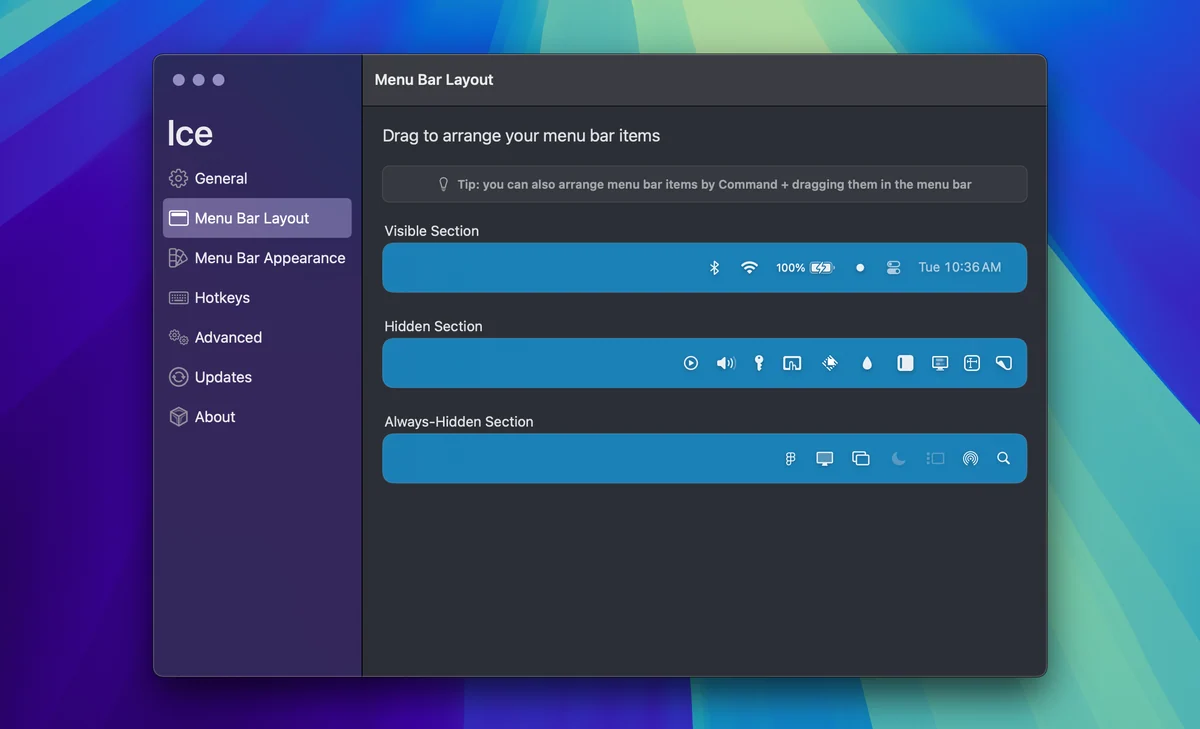
Ice is a menu-bar manager for Mac users whose status items have grown beyond a single visible row. Instead of leaving every icon in the system bar, it can hide selected items and reveal them in a separate Ice Bar below the menu bar. The project also exposes a drag-and-drop layout view, a search tool for locating an item, and appearance or spacing controls for shaping how the bar is presented. That makes it useful when a laptop notch, several background utilities, or a crowded collection of status icons makes common controls hard to find. Ice is distributed from its official GitHub releases and is licensed under GPL-3.0, so there is no vendor checkout price to compare. The current official repository says it supports macOS 14 and later because it relies on system APIs introduced in that release; older Macs are therefore outside its stated support boundary. The latest official release selected by the repository was inspected as a universal x86_64 and arm64 app bundle. Ice remains in active development, and its roadmap explicitly lists some features as unfinished, so users should test its layout and visibility behavior with their own essential menu-bar utilities before relying on it as a permanent organizer.
What it does
- Hide selected menu-bar items and reveal them in Ice Bar below the system menu bar when they are needed.
- Arrange status items through the official drag-and-drop menu-bar layout interface rather than relying only on a fixed order.
- Search for a menu-bar item and adjust presentation details such as appearance and custom item spacing.
- Install the current official release on an eligible Mac; the inspected latest app bundle contains both x86_64 and arm64 executable slices.
Ways to use it
- Keep infrequently used status icons out of the main menu bar, then reveal Ice Bar to reach them without opening a larger utility window.
- Use the layout editor to group or reposition menu-bar utilities when a laptop notch or a crowded status area makes an icon difficult to reach.
- Search for a known status item when its location is uncertain, then use the discovered item to review whether it belongs in the visible or hidden bar.
Before you download
- Ice officially supports macOS 14 and later; the project says it uses system APIs introduced in macOS 14 and does not plan to support earlier releases.
- The official repository says Ice is in active development and its roadmap lists features that are not yet implemented, so users should test it with essential menu-bar utilities before depending on a particular behavior.
- Ice is GPL-3.0 open-source software distributed through official releases, not a vendor checkout product, so users should use the project release channel and review the license rather than expect a commercial support plan.
Sources and last checked
This overview uses official or authorized sources, not hands-on testing. Each link shows what was checked and when. Prices, compatibility, and availability can change.
- Developer website · icemenubar.app
https://icemenubar.app/
Checked
App details · App images · Features and usage
Checked
Mac requirements
- Source repository · github.com
https://github.com/jordanbaird/Ice
Checked
Mac requirements · App images · Features and usage
Checked
Pricing
Checked
Mac requirements · Downloads
- Release notes · github.com
https://github.com/jordanbaird/Ice/releases/latest
Checked
Mac requirements · App images · Features and usage
Checked
Mac requirements
 Developer website · icemenubar.app
Related apps
- TuckTuck is a compact Mac menu-bar manager for people who can no longer fit their everyday status items into the visible bar.By Quartz Ink · usetuck.com
- RectangleRectangle is a focused Mac utility for putting windows into repeatable positions with keyboard shortcuts, snap areas, and optional drag-based actions.By Ryan Hanson · rectangleapp.com
- AlfredAlfred is a keyboard-first Mac launcher that can search applications, files, web searches, and selected system features from one command window.By Running with Crayons · alfredapp.com