
Utilities
Little Snitch
Little Snitch is a macOS network firewall and monitor for people who want to see which apps contact which domains and decide how those connections should be handled.
One-time purchase · Pricing details
Screenshots
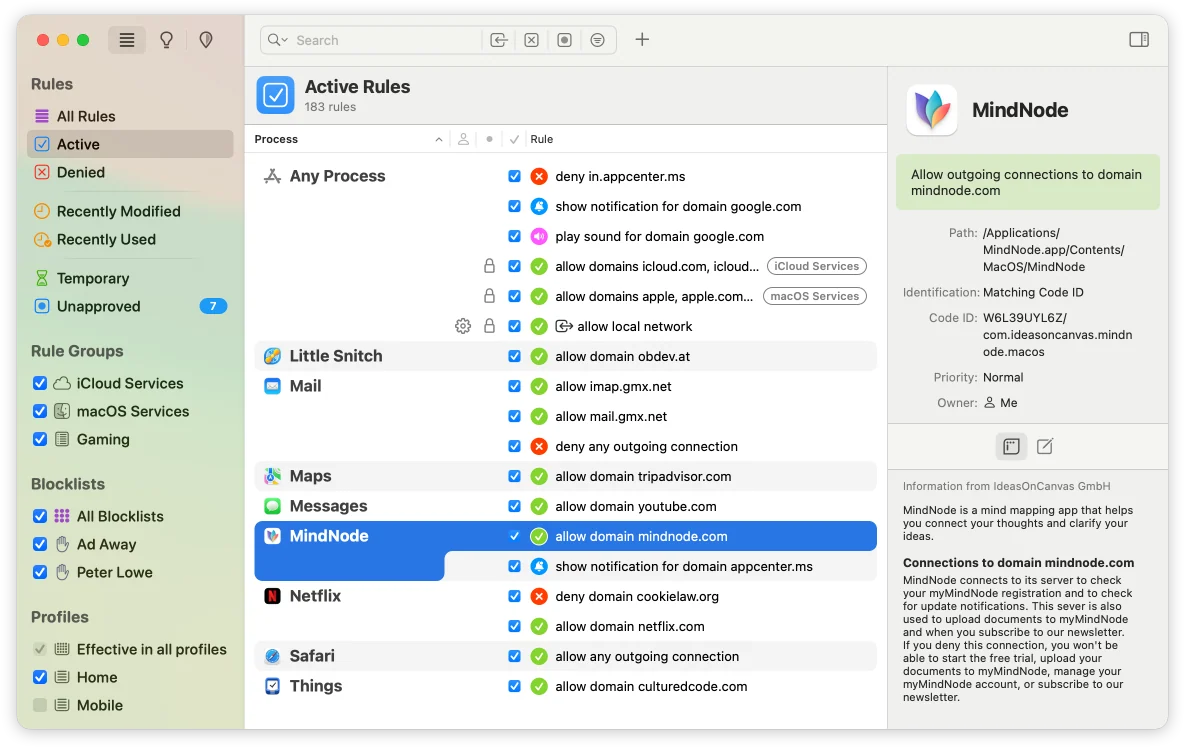
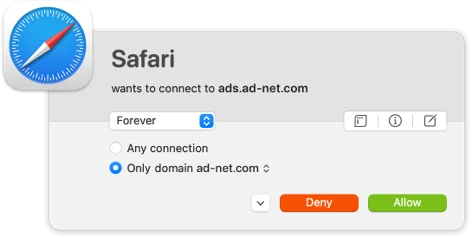
macOS Sonoma, Sequoia or Tahoe for Little Snitch 6.5 (vendor-listed compatibility)
Availability
Available for macOS
Apple Silicon; Intel
Mac support
macOS Sonoma, Sequoia or Tahoe for Little Snitch 6.5 (vendor-listed compatibility)
Overview
Overview checked .
Little Snitch is a macOS network firewall and monitor for people who want to see which apps contact which domains and decide how those connections should be handled. Objective Development's current product page describes two working modes: an alert flow that asks about a connection and a silent flow that applies existing rules. Its Network Monitor presents process and connection information, while the rule manager can organize app, domain, and system-wide decisions. The official download page now offers Little Snitch 6.5 and lists macOS Tahoe, Sequoia, and Sonoma compatibility. The earlier read-only inspection of Little Snitch 6.4.1 found x86_64 and arm64 slices and a declared macOS 14.0 minimum; that artifact observation does not establish the CPU contents of 6.5. The vendor sells direct licenses and offers demo mode without a license key, but its product page says the Network Monitor expires after 30 days in that mode. This is a security-sensitive tool: its purpose is to observe and control outgoing connections, so rule changes can interrupt apps or services. Start by reviewing alerts and existing connections rather than denying broad categories blindly, and check the current license and upgrade terms before buying for more than one person or computer.
What it does
- Review outgoing network activity by process and domain in Network Monitor, then inspect a selected connection's details before deciding what rule to create.
- Use Alert Mode to decide whether a specific connection should be allowed or denied, including a scope such as only the named domain.
- Use rule groups and profiles to organize connection decisions for applications, macOS services, and network contexts.
- The official download page now lists Little Snitch 6.5 for macOS Tahoe, Sequoia, and Sonoma. The prior Intel and Apple Silicon executable-slice finding applies to the previously inspected 6.4.1 DMG only.
Ways to use it
- Observe a new connection alert, identify the app and requested domain, then allow or deny the narrowest rule that matches the intended use.
- Use Network Monitor to trace an application's active connections, then return to the rule manager to refine an existing application or domain policy.
- Install the current architecture-matched build, evaluate the firewall in demo mode, and confirm the direct license scope before rolling it out to more Macs.
Before you download
- Little Snitch observes and controls outgoing network connections, so an overly broad deny rule can interrupt an application's expected network access; review the process and domain before saving a policy.
- The official product page says demo mode provides protection and functionality without a license key, but Network Monitor expires after 30 days; that affects ongoing evaluation workflows.
- Direct license choices and upgrades have different current scopes and prices; verify the official order page before purchasing for a family, team, or multiple computers.
Sources and last checked
This overview uses official or authorized sources, not hands-on testing. Each link shows what was checked and when. Prices, compatibility, and availability can change.
- Developer website · obdev.at
https://www.obdev.at/products/littlesnitch/index.html
Checked
App details · Mac requirements · App images · Features and usage
Checked
Mac requirements
- Release notes · obdev.at
https://www.obdev.at/products/littlesnitch/download.html
Checked
App images · Features and usage
Checked
Mac requirements · Features and usage
- Pricing · obdev.at
https://www.obdev.at/products/littlesnitch/order.html
Checked
Features and usage
Checked
Pricing
Checked
Mac requirements · Downloads
- Release notes · obdev.at
https://www.obdev.at/downloads/littlesnitch/LittleSnitch-6.4.1.dmg
Checked
Mac requirements · Features and usage
- Developer website · obdev.at
https://www.obdev.at/products/littlesnitch/compare.html
Checked
Pricing
 Developer website · obdev.at
 Pricing · obdev.at
Related apps
- AlfredAlfred is a keyboard-first Mac launcher that can search applications, files, web searches, and selected system features from one command window.By Running with Crayons · alfredapp.com
- Keyboard MaestroKeyboard Maestro is a Mac automation editor for people who are willing to turn repeated desktop work into named macros.By Stairways Software · keyboardmaestro.com
- RaycastRaycast is a keyboard-first command surface for Mac users who want to launch apps, find files, run built-in utilities, and reach smaller workflow tools without opening a chain of separate windows.By Raycast · raycast.com