Video & Audio
Audio Hijack
Audio Hijack is a Mac audio-capture application for people who need a repeatable recording setup instead of a single device input.
One-time purchase · Pricing details
Screenshots
macOS 14.4 through 27 (Audio Hijack 4.6.0, vendor-listed range)
Availability
Available for macOS
Apple Silicon; Intel
Mac support
macOS 14.4 through 27 (Audio Hijack 4.6.0, vendor-listed range)
Overview
Overview checked .
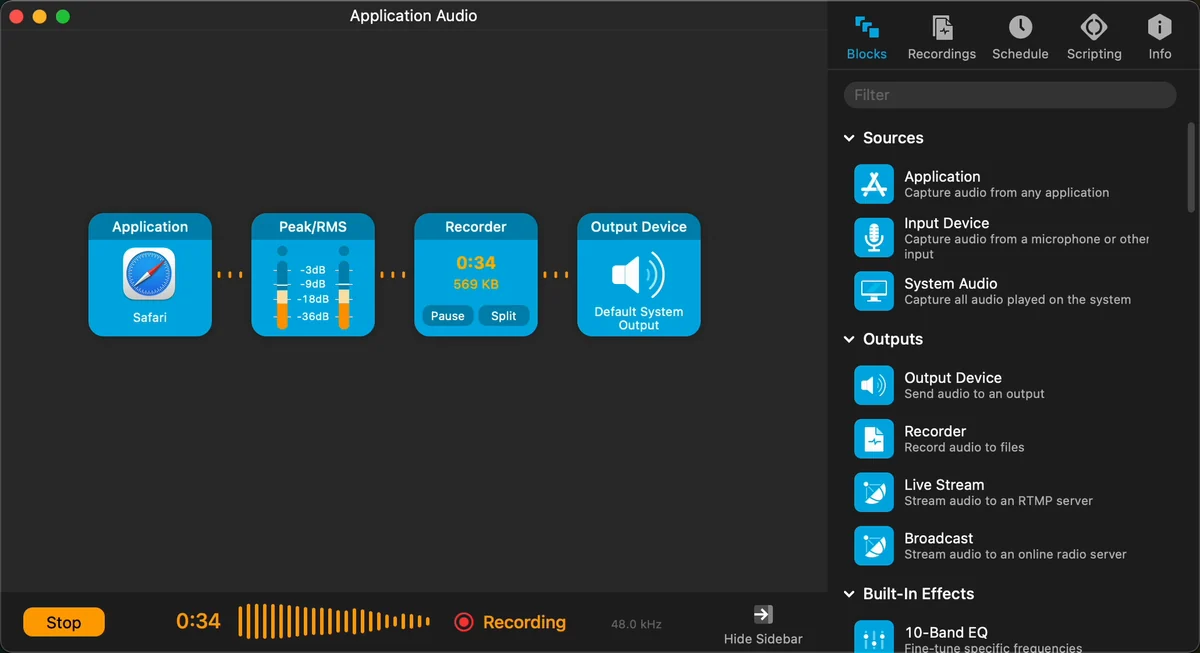
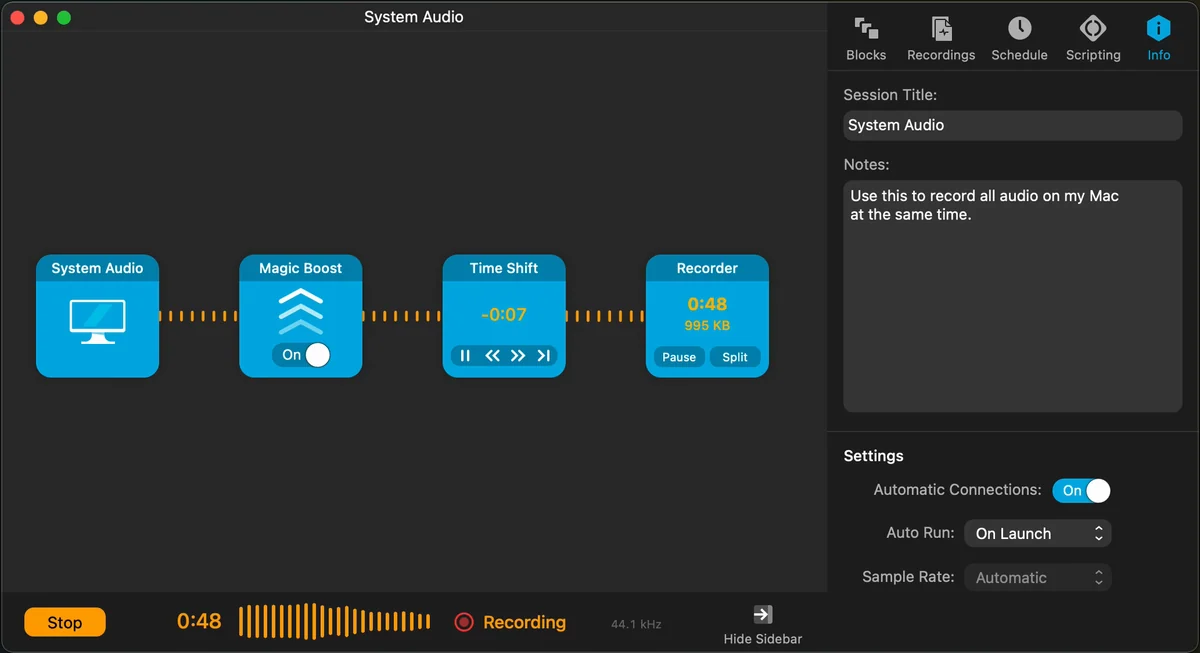
Audio Hijack is a Mac audio-capture application for people who need a repeatable recording setup instead of a single device input. Its session canvas combines source, processing, and output blocks, so a project can capture a selected application, a microphone or other input device, or all system audio, then send it to a file, device, stream, or broadcast destination. That approach is useful for podcasters, remote-call producers, and anyone who needs a saved audio chain rather than a new routing setup every time. Rogue Amoeba offers the complete application as a free trial and sells a $69 single-user license; local taxes can change the checkout total. The official product page now lists Audio Hijack 4.6.0 for macOS 14.4 through 27. The earlier 4.5.9 status entry was limited to macOS 14.4 through 26; the prior Intel and Apple-silicon slice observation applies only to the previously inspected 4.5.9 package, not the current 4.6.0 download. Because the app can capture application, device, and system audio, users should make sure every recording has an appropriate source and permission basis before they start. It fits recurring production work especially well, but it is more involved than a basic one-click recorder.
What it does
- Build a reusable session from application, input-device, or system-audio sources plus processing and output blocks instead of recreating an audio path for each recording.
- Capture audio from a selected Mac application, a microphone or other input device, or all system audio, then send it to a recorder or supported output.
- The official product page lists Audio Hijack 4.6.0 for macOS 14.4 through 27. The prior x86_64 and arm64 executable-slice observation applies only to the previously inspected 4.5.9 package.
- Evaluate the full application in its free trial before purchasing a single-user license for one or more personally owned Macs.
Ways to use it
- Save a session that records a chosen application through meters and a recorder block, then reuse the same routing for the next episode or capture.
- Build a system-audio session with processing such as Magic Boost or Time Shift before recording, rather than relying on a single default microphone source.
- Test the free trial with the real app, device, or system-audio source that needs capture before purchasing a license for a recurring workflow.
Before you download
- Audio Hijack captures application, input-device, and system audio, so recording a call, stream, or other source still requires an appropriate permission and lawful recording basis.
- The current official product page lists Audio Hijack 4.6.0 for macOS 14.4 through 27. The earlier 4.5.9 status entry and package inspection do not establish the contents or architecture of the current download.
- The $69 license is a single-user purchase and local taxes may be added, so review the current checkout total and license terms before buying for a shared environment.
Sources and last checked
This overview uses official or authorized sources, not hands-on testing. Each link shows what was checked and when. Prices, compatibility, and availability can change.
- Developer website · rogueamoeba.com
https://rogueamoeba.com/audiohijack/
Checked
App details · Mac requirements · App images · Features and usage
Checked
Mac requirements · Features and usage
- Pricing · rogueamoeba.com
https://rogueamoeba.com/audiohijack/buy.php
Checked
App images · Features and usage
Checked
Pricing
Checked
Mac requirements · Downloads
- Help and support · rogueamoeba.com
https://rogueamoeba.com/status/
Checked
App images · Features and usage
Checked
Mac requirements
- Release notes · rogueamoeba.com
https://rogueamoeba.com/audiohijack/download.php
Checked
Mac requirements · App images · Features and usage
Checked
Mac requirements
- Help and support · rogueamoeba.com
https://rogueamoeba.com/support/manuals/audiohijack/
Checked
App details · App images · Features and usage
Checked
Mac requirements
 Developer website · rogueamoeba.com
 Pricing · rogueamoeba.com
 Help and support · rogueamoeba.com
Related apps
- SuperwhisperSuperwhisper is a macOS voice-to-text app for turning spoken input into text in the application you are already using.By Superwhisper · superwhisper.com
- Screen StudioScreen Studio is a macOS screen recorder and editor for people who need a short product demo, tutorial, or visual explanation without assembling every camera move by hand.By Screen Studio · screen.studio
- ShottrShottr is a compact macOS screenshot application for people who need to capture an image and immediately mark it up, measure it, or pull text from it.By Shottr · shottr.cc