 Developer website · bear.app
 Help and support · bear.app
- Task
- Write, organize and find personal notes.
- Why it may fit
- Consider Obsidian if you want Markdown files in a local folder and links that connect your notes.
- Limitation
- It is a different way to organize notes, not a drop-in replacement. Check how your tags, attachments and links will move; migration and sync have not been tested.
Writing
Bear
Bear is a Mac note editor for people who prefer a writing surface that stays close to plain text while still offering the structure needed for a personal notebook.
Free + paid options · Pricing details
Screenshots
macOS 12.4 or later
Availability
Available for macOS
Apple Silicon; Intel
Mac support
macOS 12.4 or later
Overview
Overview checked .
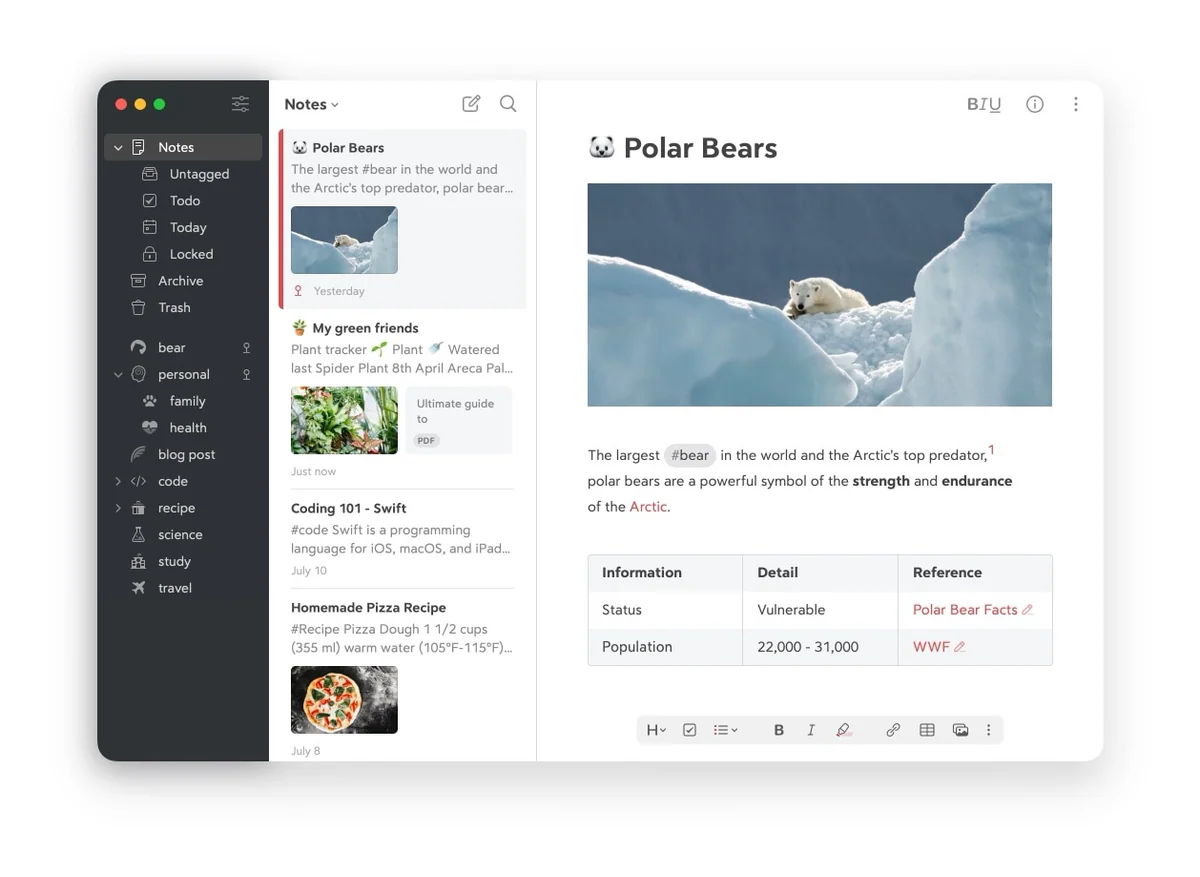
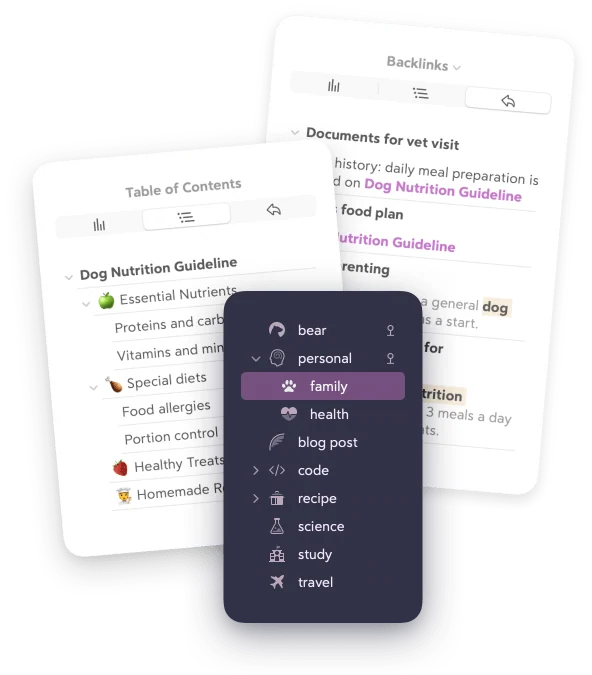
Bear is a Mac note editor for people who prefer a writing surface that stays close to plain text while still offering the structure needed for a personal notebook. Its core model is a single stream of notes organized with tags, including nested tags, rather than folders, projects, or a database builder. Markdown formatting, tables, to-dos, wiki links, backlinks, and a table of contents make it practical for connected research notes as well as short drafts. The free tier keeps local access, document scanning, several export formats, and a small set of themes; Bear Pro adds iCloud sync, more export formats, more themes and icons, encryption for individual notes, and text search inside PDFs and images. That makes the paid tier worth considering if the same library must follow you between Apple devices or if your archive needs richer output. Bear is intentionally Mac and Apple-platform focused, not a team workspace. Before moving important material into it, test the tag-first organization and confirm whether the Pro subscription, iCloud requirement for sync, and export formats fit the way you need to retrieve or share notes later.
What it does
- Write notes with Markdown, tables, to-do lists, photos, and tags in the same document instead of switching between separate content modes.
- Use nested tags, wiki links, backlinks, and a table of contents to connect notes and move through a larger personal knowledge base.
- Export notes as plain text, Markdown, TextBundle, and rich text on the free tier, with PDF, HTML, DOCX, JPG, and ePub export listed for Bear Pro.
- Use Bear Pro for iCloud sync, individual-note encryption, more themes and app icons, and search inside images and PDFs.
Ways to use it
- Capture a note in plain text, add nested tags as the subject becomes clearer, then use the tag sidebar to revisit related material without filing it into a rigid folder tree.
- Draft a structured note with Markdown, headings, tables, and task items, then export an appropriate finished format when it needs to leave the notebook.
- Use Pro iCloud sync and linked notes when a personal reference library needs to remain available across the developer's Apple-device editions.
Before you download
- Bear Pro is a subscription: the official product page lists a seven-day trial followed by monthly or yearly billing, with local access remaining in the free tier.
- iCloud sync, individual-note encryption, richer export formats, and search inside PDFs and images are listed as Pro features, so a free installation does not provide the complete workflow.
- The current official Mac listing requires macOS 12.4 or later, so an older Mac should be checked before a library is migrated.
Sources and last checked
This overview uses official or authorized sources, not hands-on testing. Each link shows what was checked and when. Prices, compatibility, and availability can change.
- Developer website · bear.app
https://bear.app/
Checked
App details · Mac requirements · App images · Features and usage
Checked
Pricing
Checked
Mac requirements · Downloads
- Official source · apps.apple.com
https://apps.apple.com/it/app/bear-markdown-notes/id1091189122?l=en-GB&mt=12
Checked
Mac requirements · App images · Features and usage
Checked
Pricing
Checked
Mac requirements
- Help and support · bear.app
https://bear.app/faq/
Checked
App details · App images · Features and usage
Checked
Mac requirements
Related apps
More apps to explore
- CraftCraft is a document and note workspace for people who want to write, arrange ideas, and share finished material without moving every project into a separate task board or database.By Craft Docs Limited · craft.do
- NotePlanNotePlan brings daily notes, tasks, and calendar context into a single planning surface for people who prefer working from text instead of maintaining separate notebooks and task boards.By NotePlan · noteplan.co
- SoulverSoulver is a notepad-style calculator for people who would rather write a short line of reasoning than construct every calculation through a traditional keypad.By Acqualia · soulver.app