
Developer Tools
OrbStack
OrbStack is a macOS tool for running Docker containers and Linux machines from a native desktop app and command line.
Free + paid options · Pricing details
Screenshots
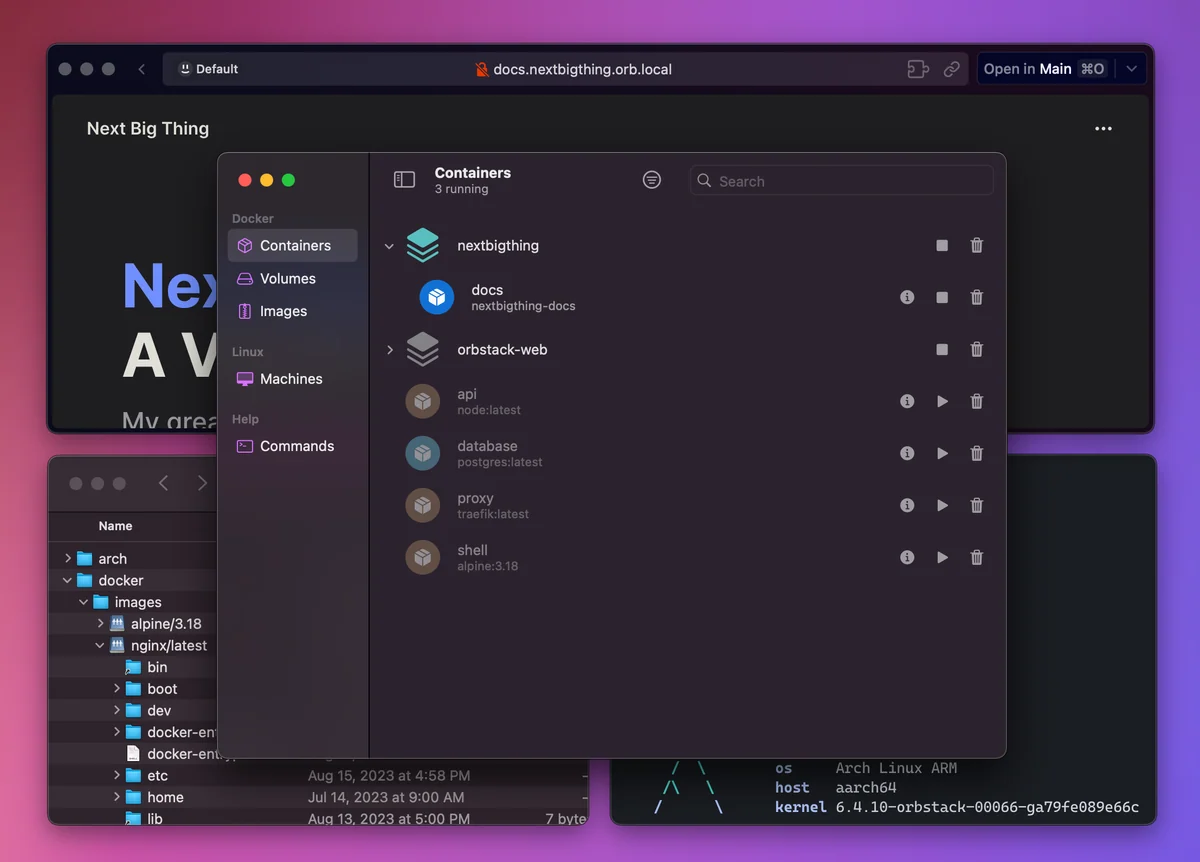
macOS 14.0 or later
Availability
Available for macOS
Apple Silicon; Intel
Mac support
macOS 14.0 or later
Overview
Overview checked .
Choose OrbStack when a Mac development setup needs Docker containers and Linux machines together. Its app and command-line environment brings those workflows alongside networking, file sharing, and SSH. OrbStack’s docs describe Linux machines with a shared kernel and state that they are not a full-VM boundary against actively malicious code. The current download page lists separate Apple Silicon and Intel builds for macOS 14 or later. The free plan is limited to personal, non-commercial use; check current Pro terms before business use. Docker Desktop data migration is optional, and switching Docker contexts or command-line setup can change which engine existing commands use, so inspect that setup before moving a working project. This is a source-based overview, not a hands-on test.
This overview compares documented workflows and limitations from official sources. It is not a hands-on product test. Choose developer tools by job. Compare database and file-transfer workflows.
What it does
- Run Docker containers, Kubernetes, and Linux machines from the same macOS application and command-line environment.
- Use separate official Apple Silicon and Intel downloads on macOS 14.0 or later.
- Share Mac files with containers and machines through optimized VirtioFS-based mounts and the documented bidirectional file-sharing path.
- Use Rosetta-based x86 emulation on Apple Silicon for supported container and Linux-machine workflows.
- Use the free plan for personal non-commercial use, or the commercial Pro plan for business use and its additional features.
Ways to use it
- Start a Compose project, use the local domain and port-forwarding integration, then inspect its files from macOS as you iterate.
- Create a Linux machine for a project-specific service, then connect using the included command-line tools or SSH integration.
- Move from Docker Desktop by reviewing your current context and optionally copying Docker data with OrbStack's migration flow.
Before you download
- OrbStack requires macOS 14.0 or later, so older Macs are outside the current supported download requirement.
- The free tier is for personal, non-commercial use; business and commercial use require the current Pro terms, so verify plan eligibility before deploying it at work.
- Migration can copy existing Docker Desktop data and setup can alter Docker context or command-line links, so inspect local infrastructure state before switching.
- Shared-kernel Linux machines are not a full-VM security boundary for actively malicious code; use the documented isolated-machine model when that distinction matters.
Sources and last checked
This overview uses official or authorized sources, not hands-on testing. Each link shows what was checked and when. Prices, compatibility, and availability can change.
- Developer website · orbstack.dev
https://orbstack.dev/
Checked
App details · Mac requirements · App images · Features and usage
Checked
Mac requirements
Checked
Features and usage
- Pricing · orbstack.dev
https://orbstack.dev/pricing
Checked
Features and usage
Checked
Pricing
Checked
Mac requirements · Downloads
Checked
Features and usage
- Release notes · orbstack.dev
https://orbstack.dev/download
Checked
Mac requirements · App images · Features and usage
Checked
Mac requirements
Checked
Features and usage
- Mac requirements · docs.orbstack.dev
https://docs.orbstack.dev/architecture
Checked
Mac requirements · Features and usage
Checked
Features and usage
- Help and support · docs.orbstack.dev
https://docs.orbstack.dev/install
Checked
App images · Features and usage
Checked
Mac requirements
Checked
Features and usage
 Developer website · orbstack.dev
 Pricing · orbstack.dev
 Mac requirements · docs.orbstack.dev
Related apps
- NovaNova is Panic's Mac-native editor and IDE for developers who want source editing, project tools, Git, debugging, and file transfer work in one desktop workspace.By Panic · nova.app
- TablePlusTablePlus is a native database client for Mac users who want a single desktop workspace for connecting to several database systems without moving among vendor-specific tools.By TablePlus · tableplus.com
- TransmitTransmit is Panic's macOS file-transfer client for people who regularly move files between a Mac and hosted servers or cloud storage.By Panic · panic.com