
Developer Tools
Transmit
Transmit is Panic's macOS file-transfer client for people who regularly move files between a Mac and hosted servers or cloud storage.
One-time purchase · Pricing details
Screenshots
macOS 13.0 or later
Availability
Available for macOS
Apple Silicon; Intel
Mac support
macOS 13.0 or later
Overview
Overview checked .
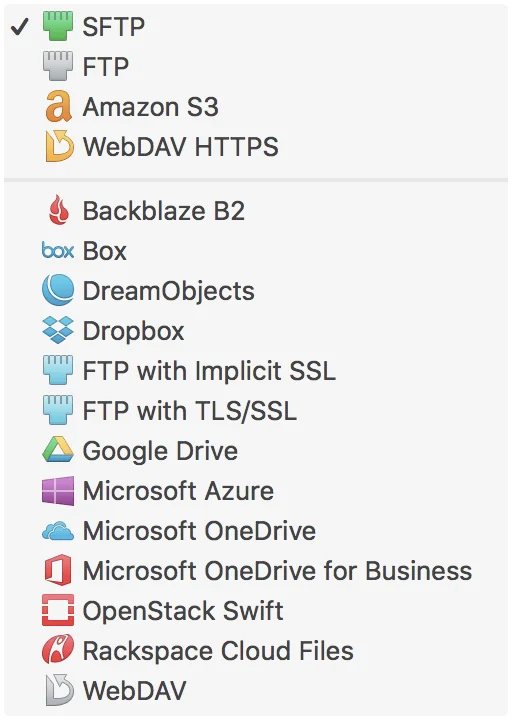
Transmit is Panic's macOS file-transfer client for people who regularly move files between a Mac and hosted servers or cloud storage. The current product page lists FTP, SFTP, WebDAV, Backblaze B2, and Amazon S3 among the services it can connect to, and its two-pane interface is geared toward browsing source and destination files together. That makes it a practical candidate for web developers, operations staff, and freelancers who need a dedicated transfer workspace instead of treating every remote service as a separate browser task. Panic offers a full seven-day trial from its own download page, followed by a $45 unlock code for the current version; it also provides a Mac App Store listing. The app requires macOS 13.0 or later, and local inspection of Panic's current official ZIP found both Intel and Apple-silicon executable slices. Transmit's convenience does not remove the security implications of remote access: each saved connection can carry credentials and write access to a real destination. Test the exact protocol, authentication method, and sync behavior against a non-critical folder first, then confirm who owns the remote account and which paths are safe to overwrite. If direct purchase is important to your workflow, compare the current Panic terms with the App Store path before committing.
What it does
- Connect to server and cloud services including FTP, SFTP, WebDAV, Backblaze B2, and Amazon S3 from one Mac application.
- Browse local and remote files in a two-pane transfer interface instead of moving through a browser upload form for each service.
- Use the current official direct-download build on a compatible Mac; the inspected Transmit executable includes both x86_64 and arm64 slices.
- Start with Panic's seven-day full-version trial, then use a direct unlock code if the current $45 single-copy purchase fits the workflow.
Ways to use it
- Open a saved SFTP or FTP connection to upload a prepared site build while keeping local and remote folders visible together.
- Use a transfer workspace to manage an Amazon S3 or Backblaze B2 destination when a project needs files placed in a specific remote bucket or path.
- Test a sync configuration against a non-critical folder before using it with a production-facing remote destination.
Before you download
- The current Panic download is a full version that works for seven days; continued direct use requires buying an unlock code, currently listed at $45 plus tax per copy.
- Transmit requires macOS 13.0 or later according to Panic and Apple's current Mac App Store listing.
- Remote transfers depend on the protocol, credentials, permissions, and overwrite rules of the destination you configure, so verify sync and deletion behavior before using a sensitive or production path.
- The direct Panic unlock is a one-time purchase, while the US Mac App Store listing offers a $24.99 yearly subscription; pricing and terms differ by purchase channel and region.
Sources and last checked
This overview uses official or authorized sources, not hands-on testing. Each link shows what was checked and when. Prices, compatibility, and availability can change.
- Developer website · panic.com
https://panic.com/transmit/
Checked
App details · Mac requirements · App images · Features and usage
Checked
Pricing · Features and usage
Checked
Mac requirements · Downloads
- Official source · apps.apple.com
https://apps.apple.com/us/app/transmit-5/id1436522307?mt=12
Checked
App images · Features and usage
Checked
Pricing · Features and usage
Checked
Mac requirements
- Release notes · download.panic.com
https://download.panic.com/transmit/Transmit-5-Latest.zip
Checked
Mac requirements · App images · Features and usage
Checked
Mac requirements
 Developer website · panic.com
 Release notes · download.panic.com
Related apps
- NovaNova is Panic's Mac-native editor and IDE for developers who want source editing, project tools, Git, debugging, and file transfer work in one desktop workspace.By Panic · nova.app
- TablePlusTablePlus is a native database client for Mac users who want a single desktop workspace for connecting to several database systems without moving among vendor-specific tools.By TablePlus · tableplus.com
- TowerTower is a desktop Git client for Mac users who want a dedicated place to inspect a working copy, move between branches, and read diffs before they commit.By fournova · git-tower.com